 Dinner Appointments
Hosting the missionaries for dinner
For members and families who want to feed the missionaries.
In short: pick an open night for the Elders or the Sisters, choose a time, and confirm. You’ll see their allergies and food notes, get a reminder before the dinner, and the missionaries are told right away.
Booking a dinner
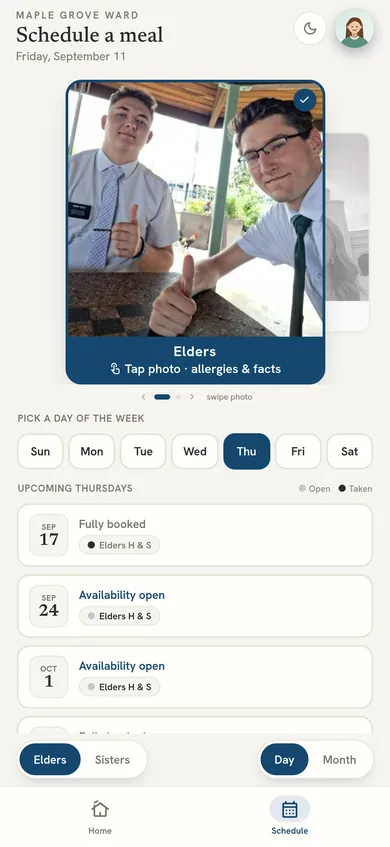
Open Dinner Appointments and choose the Elders or the Sisters. Each night shows as open or taken. Pick an open night, choose a time, and confirm. The missionaries get a text right away, and the dinner appears on your home screen with an Add to Calendar button.
Everyone in your household shares one schedule, so two people in the same home won’t book the same night by accident.
Before you cook: allergies and food notes
Tap the missionaries’ photo to see where they’re from, a few fun facts, and any allergies or foods they’d rather skip. Those notes are shown again while you book, so they’re in front of you before you plan the menu.
At home, at a restaurant, or something else
- At home: your address is shared with the missionaries for that dinner.
- At a restaurant: give the restaurant’s name and address so the missionaries know where to meet you.
- Something else: a packed lunch or a drop-off, for example. Say what to expect and the missionaries are told.
Your mission’s rules come built in
Some mission presidents limit which days dinners are allowed or ask a question before a dinner is confirmed. Dinner Appointments follows those rules: days that aren’t allowed are greyed out, and if your mission asks a question first, you’ll get it by text before the booking is final.
Reminders, and changing plans
You get a reminder before each dinner by app notification, text or email (choose in your profile). Need to move or cancel? Do it in the app, or just text or call the ward line and the assistant updates it and tells the missionaries.
Questions
How do I book a dinner with the missionaries?
In Dinner Appointments, choose the Elders or the Sisters, pick an open night and a time, and confirm. The missionaries are told by text right away.
How do I know the missionaries' allergies?
Tap the missionaries' photo in the app to see their allergies and food notes. The notes are shown again while you book.
Can we take the missionaries to a restaurant?
Yes. Choose a restaurant when you book and give its name and address so the missionaries know where to meet you.
How do I cancel or move a dinner?
Change it in the app, or text or call the ward line and the assistant updates the calendar and tells the missionaries.
Why are some days greyed out?
Either the missionaries aren't available that day or your mission president doesn't allow dinners on it. Dinner Appointments follows the mission's rules automatically.